
Health Export
Your Health data as CSV, JSON or Markdown files. Pick the data, pick a period, pick a format, and share or save the file.
Coming soon to the App StoreFor iPhone and iPad. Read only. No account.

Three choices, one file.
Health Export reads the data you allow from Apple Health and writes it to a file you own. Open it in Numbers, Excel or Google Sheets, or feed it to your own scripts.
01Data
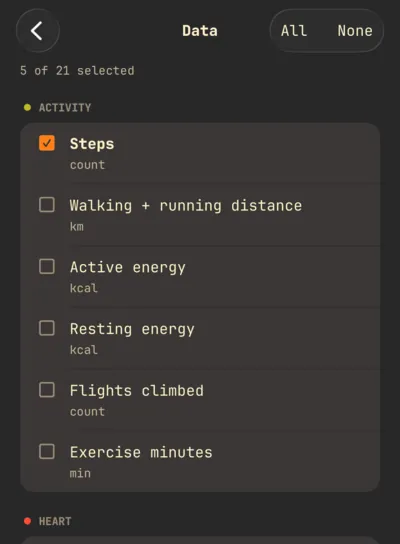
21 kinds of Health data
Activity
Steps, walking and running distance, active and resting energy, flights climbed, exercise minutes
Heart
Heart rate, resting heart rate, walking heart rate average, heart rate variability, VO2 max
Respiratory
Respiratory rate, blood oxygen
Body
Weight, height, body mass index, body fat, lean body mass, waist circumference
Sleep
Stages, or minutes per night
Workouts
Type, duration, energy and distance
02Period
Any period
Today, yesterday, the last 7, 30 or 90 days, this year, the last 12 months, all time, or your own dates. Periods longer than 30 days come with Pro.
- Today
- Yesterday
- Last 7 days
- Last 30 days
- Last 90 days
- This year
- Last 12 months
- All time
- Custom
03Format
Files that work
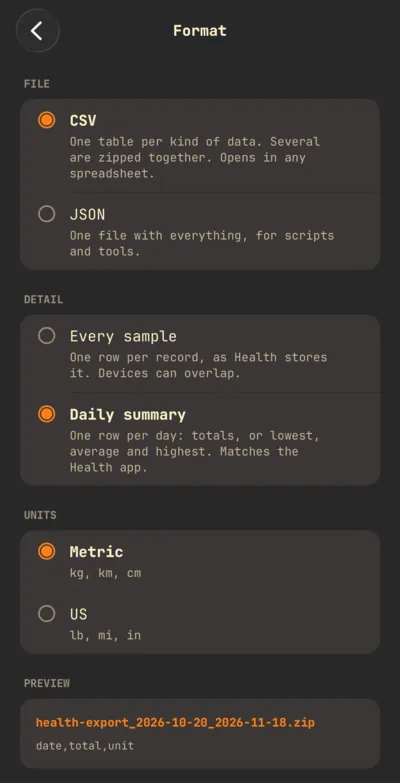
- CSV: one table per kind of data, zipped together when you pick several.
- JSON: one file with everything, for scripts and tools.
- Markdown, LLM friendly: one text file with a table per kind of data and a header that explains it, ready to paste into an AI assistant.
- Every sample as Health stores it, or a daily summary with totals or lowest, average and highest.
- Metric or US units. Timestamps carry your time zone offset, so every row is unambiguous.
date,total,unit
2026-11-16,8412,count
2026-11-17,10233,count
2026-11-18,6120,countdate,min,average,max,unit
2026-11-16,52,71.4,148,bpm
2026-11-17,49,68.9,163,bpm
2026-11-18,51,70.2,131,bpm04Share
Export, then share or save
The export shows each kind of data with its record count, then the share sheet: Save to Files, AirDrop, Mail or any app you like.
The file leaves your device only when you share it.

See the file before you make it
The Format screen explains every choice and previews the file name and columns.
Private by design.
Your Health data leaves your device only in a file you choose to share.
- Read onlyHealth Export reads only the data you allow, and never writes to or changes your Health data.
- No serverExports are made on your iPhone or iPad. We never receive your Health data.
- No account, no trackingNothing to sign up for. No advertising ID, no tracking across apps or websites.
- Anonymous usage, your callAnonymous usage sharing helps improve the app, never includes Health data, and you can switch it off in Settings.
Read the full privacy policy.
Free to start.
Every kind of data and both formats are free for periods up to 30 days. Pro is for longer history and automation.
Free
Every kind of data, in every format, for periods up to 30 days.
Pro
Any period, up to all time and your own dates, plus a Shortcuts action to export from the Shortcuts app and automations.
Pro is an auto-renewing subscription for iPhone and iPad.
Questions
Does Health Export change my Health data?
No. It only reads, and only the kinds of data you allow. You can change that at any time in Settings > Health > Data Access & Devices > Health Export.
Where do my files go?
Nowhere until you share them. After an export you pick where the file goes: Save to Files, AirDrop, Mail or another app.
Which apps open the files?
CSV opens in Numbers, Excel, Google Sheets and most data tools. JSON is one file with everything, for scripts and tools. Markdown is plain text with tables, easy for AI assistants to read.
Why are some days missing or empty?
The export holds what Apple Health has for that period. A kind of data with no records still gets its file with the header row, so you can tell it was included.
Which devices does it run on?
iPhone and iPad with iOS 26.2 or later.